Enterprise AI · Private by construction

The AI workspace that
never leaves your boundary.

Topsoil gives engineering and business teams a capable AI assistant without handing your source code, documents or prompts to someone else's platform. Inference runs through the endpoint you configure, inside the account, region and network you already control.

No vendor-operated inference · No prompt store · No telemetry stream

01

Model flexibility

Use the leading model families — OpenAI, Anthropic Claude, xAI Grok, Amazon Nova and Meta Llama among them — and change your mind later. Models are selected from what your own account enables, so a new one becomes available the day you turn it on.
02

A private enclave you control

Topsoil runs against your account, your region, your network path and your IAM policy. That is what makes data sovereignty real rather than contractual: the work never transits a platform operated by us.

03

No external vendor telemetry

There is no analytics pipeline, no usage beacon and no prompt collection leaving your environment. Nothing about your code, your documents or your people is reported anywhere.

Most AI tools ask you to trust a policy document. Topsoil removes the question: there is no vendor-operated control plane in the path, so there is nothing to trust us about.

Where it runs

One agent. The places your people already work.

Engineers live in a terminal and an editor. Analysts, marketers and proposal teams live in an application window. Topsoil is the same product and the same governance in all of them.

Desktop

Native application

A full workspace for macOS and Windows: projects, a context library, documents, diagrams, shared channels and a built-in console. The natural home for people who do not live in a terminal.

macOS · Windows
Terminal

The TUI

The whole agent in a terminal — on a laptop, a build box, a bastion host or an air-gapped workstation. Same models, same permission model, no desktop required.

macOS · Windows · Linux
Editor

VS Code extension

A bridge, not a second agent. It lends the terminal agent your unsaved buffers, selection, open files and diagnostics, then opens a diff of what the turn wrote. The agent keeps running in the integrated terminal.

Ships inside the app · Not via Marketplace

Inside the workspace

You can always see what the model was given.

Every answer shows its sources. The side panel lists the working folder, each attached file, how much of the context window is spent and what the turn cost — so context is something you inspect, not something you hope about.

  • The working folder, file by file, with nothing implicit.
  • A token budget you can watch rather than discover in a bill.
  • Per-turn cost, shown as the turn happens.

See more of the product →

Route Planner  ·  US Claude Sonnet 4.5
Working folder9 files

~/Projects/route-planner

  • src/eta/cache.ts
  • src/eta/reroute.ts
  • src/routes/types.ts
  • src/server.ts
  • test/eta-cache.test.ts
3 project files · ~462 / 50k tokens1% of budget
this turn2,975 in · 251 out · ~$0.013
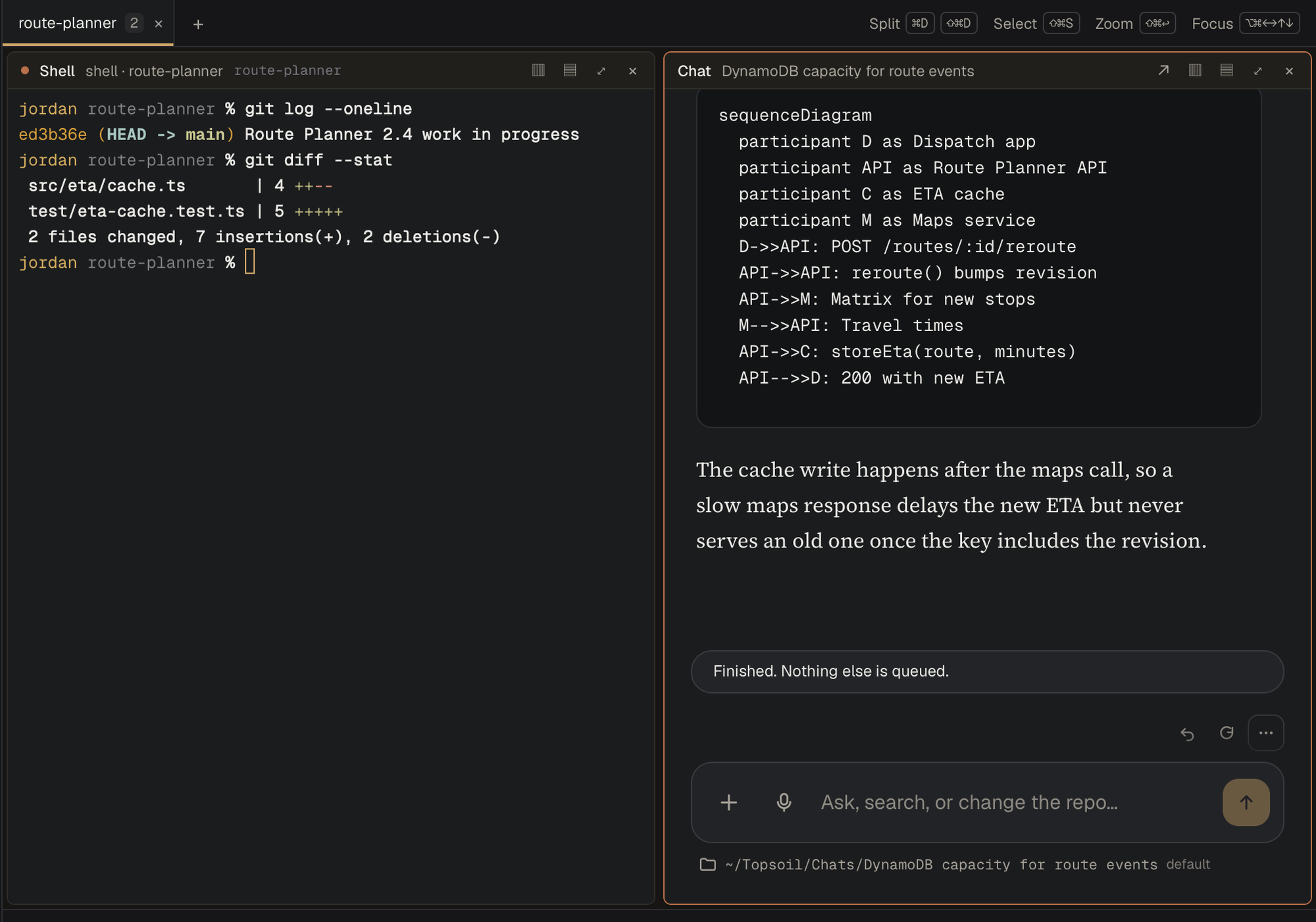
The Topsoil console on macOS: a shell pane running git log and git diff --stat beside a chat explaining the change, with a sequence diagram.

A shell and a chat, on the same folder. git log and git diff --stat in one pane, the conversation about that change in the other — both inside the desktop app, with no window to switch to.

Software and AI engineering

Built to do the work, not just describe it.

Topsoil reads the repository, proposes the change, runs the command, opens the diff and verifies the result — with a permission gate in front of anything that touches your machine.

Codebase

Real workspace context

Inspect and edit files, follow language-server intelligence, and search a local semantic index that respects .gitignore and never uploads your source to build itself.

Execution

Approved shell and Git

Run commands and Git operations under allowlists and path protections. Commands run without a shell, exactly as shown to you before they run.

Workflow

Multi-model stages

Apply different models to explore, plan, implement, review and verify. Use a fast model to search and a strong one to reason, within a single piece of work.

Delivery

Backlog to pull request

Take an issue through isolated worktrees to a reviewed pull request. Backlogs can be GitHub Issues, Jira Data Center with Bitbucket, or a CSV export on disk.

Verification

Proof, not assertion

Verify runs the changed test with the rest of the work reverted and requires it to fail first. A test that passes without the change does not count as done.

Integration

MCP and your systems

Add MCP servers over stdio, HTTP or WebSocket, enable them per project, and keep every secret host-side where the model never sees it.

Control

Nothing happens without a decision.

Plan mode stays read-only until you approve. Every edit and every command surfaces first — with the diff, the path and the exact command — and you choose once, for that path, for that tool, or for the rest of the session.

  • Plan-first by default. Read-only until explicitly released.
  • Tool risk classes and per-path protections you set per project.
  • Command allowlists, with commands run without a shell.
  • Agent features are off until someone turns them on deliberately.
Review patch  ·  waiting for approval
src/eta/cache.ts (+1 −1)
−  const entry = etaCache.get(route.id);+  const entry = etaCache.get(`${route.id}:${route.revision}`);
Accept once1 Rejectesc Always this path Always this tool3
jordan@route-planner — topsoil
$ topsoil models
Models in us-east-1 (refreshed now)

OpenAI
  openai.gpt-5.6-terra         tools · docs
  openai.gpt-5.4               tools · docs

Anthropic
* us.anthropic.claude-sonnet-4-5  tools · docs · images
  us.anthropic.claude-opus-4-5    tools · docs · images

xAI
  us-gov.xai.grok-4.6          tools · docs · images

Amazon
  us.amazon.nova-pro-v1:0      tools · docs · images

* default model

Model flexibility

Bring the models. Keep the workspace.

Topsoil is not a wrapper around one vendor's model — OpenAI, Anthropic, xAI and the rest sit side by side. It lists what your account actually offers, groups it by vendor, and lets a person pick from a scrollable list rather than pasting an identifier. Change the default for a session, a project or a workflow stage.

  • The leading families — OpenAI, Claude, Grok, Nova and Llama among them.
  • Your entitlements decide. Enable a model in your account and it appears.
  • Different models per stage, so cost and capability match the task.
  • No lock-in to a single provider's roadmap, pricing or availability.

Privacy, security and data sovereignty

Your boundary is the product boundary.

Topsoil was built for organizations that cannot send engineering context or commercial documents to a multi-tenant platform — regulated industries, defense programs and anyone whose data has a jurisdiction.

Residency

The data never leaves

Prompts, source, documents and output stay inside the account, region and network path you configure. There is no Topsoil-operated service in the request path and no prompt store anywhere outside your environment.

Telemetry

Nothing is reported

No analytics, no usage beacons, no crash payloads carrying your content. The absence is architectural: there is no pipeline to disable, because one was never built.

Identity

The controls you already run

Authenticate with IAM roles and keys, AWS profiles, IAM Identity Center (SSO), or a gateway bearer token. Access, logging and retention stay under your existing policy.

Isolation

Private network paths

Public endpoints, custom HTTPS endpoints, or reachable PrivateLink and VPC paths — including isolated and government cloud partitions where that is the requirement.

Safe defaults, visible settings

Agent capabilities start switched off. Turning one on is a deliberate act with a confirmation, so a workspace is never more capable than someone intended it to be.

Settings · Agent features
  • ✓ File edits
    apply_patch, write_file, notebook_edit, and saved plans.
  • ✓ Shell commands
    run_command, PowerShell, background jobs, and /sandbox.
  • ✓ MCP servers
    Start stdio/HTTP/WebSocket servers and their tools and prompts.
  • ✓ Browser automation
    Drive a local Chrome/Edge over CDP.

Agent tools can read and modify files, run commands, and start local servers. Only enable for projects you trust.

Artifacts
$ /report Route Planner 2.4 readiness
write document docs/route-planner-2.4-readiness.pdf
Files3
  • route-planner-2.4-readiness.pdf 3.31 KB
  • q3-proposal-summary.docx 18 KB
  • depot-readiness.xlsx 24 KB

Saved into the working folder. PDF, Word, Excel and Markdown.

Beyond engineering

The same privacy, for the rest of the business.

Contracts, proposals, pricing models and campaign plans are exactly the material an organization cannot paste into a public assistant. Topsoil writes real files — PDF reports, Word memos, Excel workbooks and Markdown — against a private library of your own documents.

  • Proposal and contract work — draft, compare and summarize against prior awards and templates held in your own library.
  • Marketing — briefs, campaign plans and positioning that can reference confidential roadmap material.
  • Analysis — retrieve from PDFs, Office files and scanned documents, and get a spreadsheet or a report back.
  • Shared projects and channels running in your own account, so a team can work on one thread without the files leaving it.

The terminal

Where the environment is the constraint.

On a build server, a jump host or a locked-down workstation, a desktop application is not an option. The TUI is the full agent — same models, same permission gates, same project context — in a terminal.

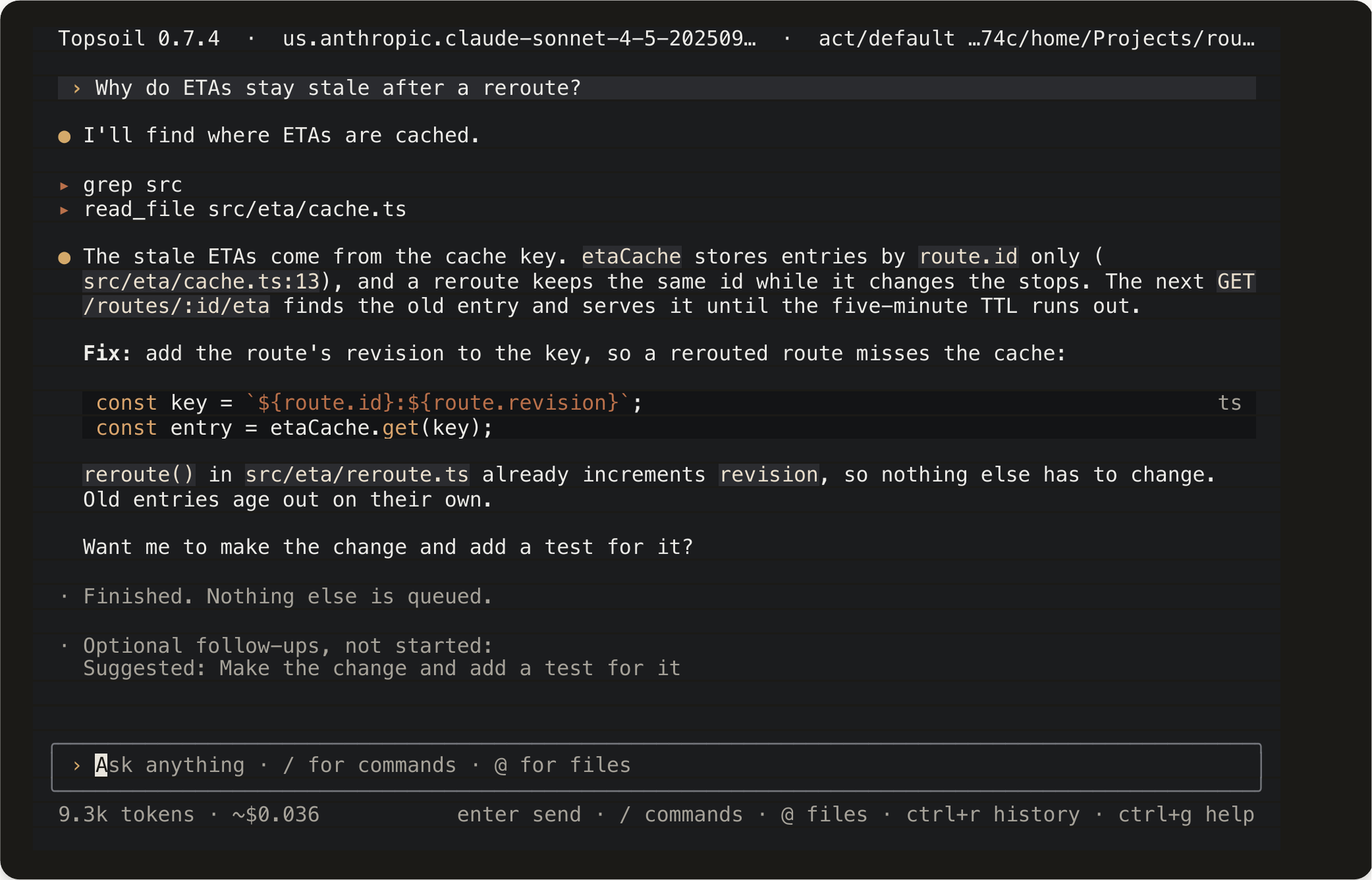
Topsoil in a terminal: it greps the source, reads src/eta/cache.ts, explains that the cache key is route.id only, and proposes adding the route revision to the key.

Real work, in a terminal. Search the repository, read the file, explain the defect and propose the change — with the token count and cost on the footer the whole time. See the full terminal walkthrough →

At a glance

What you actually get.

CapabilityWhat it means in practice
Private inferenceRequests go to the Bedrock, custom HTTPS or gateway endpoint you configure. No vendor-operated inference control plane.
Model selectionOpenAI, Anthropic, xAI, Amazon and Meta among them — every family your account enables, grouped by vendor and selectable per session, project or workflow stage.
Coding agentRead and edit files, run approved commands, use Git, language servers, browser, web and document tools.
Plan-first governanceRead-only plan mode, tool risk classes, path protections, command allowlists, explicit approvals.
Project contextProjects, attachments and a per-identity context library backed by your own storage.
Local semantic searchAn optional local index of your workspace that honours .gitignore and is built without uploading source.
DocumentsPDF reports, Word memos, Excel workbooks, Markdown and rendered diagrams, saved into your working folder.
IntegrationsMCP servers over stdio, HTTP or WebSocket, enabled per project, with secrets kept host-side.
DeliveryBacklog to pull request through isolated worktrees, with a verification step that must prove the test fails first.
CollaborationShared projects and channels running in your account, sharing the stream and selected files — not credentials, terminals or raw tool output.
SurfacesNative desktop for macOS and Windows, a cross-platform terminal client, a VS Code context bridge, and a customer-hosted web option.
DeploymentYour cloud account and region, including isolated and government partitions. Nothing is hosted by us.

Topsoil is powered by Amazon Bedrock and runs on AWS, including GovCloud — in your account, under your controls.

Get started

See it against your own codebase.

A proof of concept runs in a secure enclave with your models and your material, and ends with findings you can act on — not a demo environment and a slide.