Product tour

The product, as it ships.

What Topsoil actually shows you, surface by surface. The same agent, the same permission model and the same privacy posture in each one.

Desktop · macOS and Windows

A workspace, not a chat box.

Context you can audit

The side panel is the answer to "what did it actually read?" — the working folder, each attached file, how much of the window is spent and what the turn cost, all while the turn is happening.

Route Planner · Context
Working folder9 files

~/Projects/route-planner

  • src/eta/cache.ts
  • src/eta/reroute.ts
  • src/server.ts
Project files3
  • architecture-overview.md ~186 tokens
  • depot-sla.csv ~49 tokens
  • oncall-runbook.md ~150 tokens
~462 / 50k tokens1% of budget
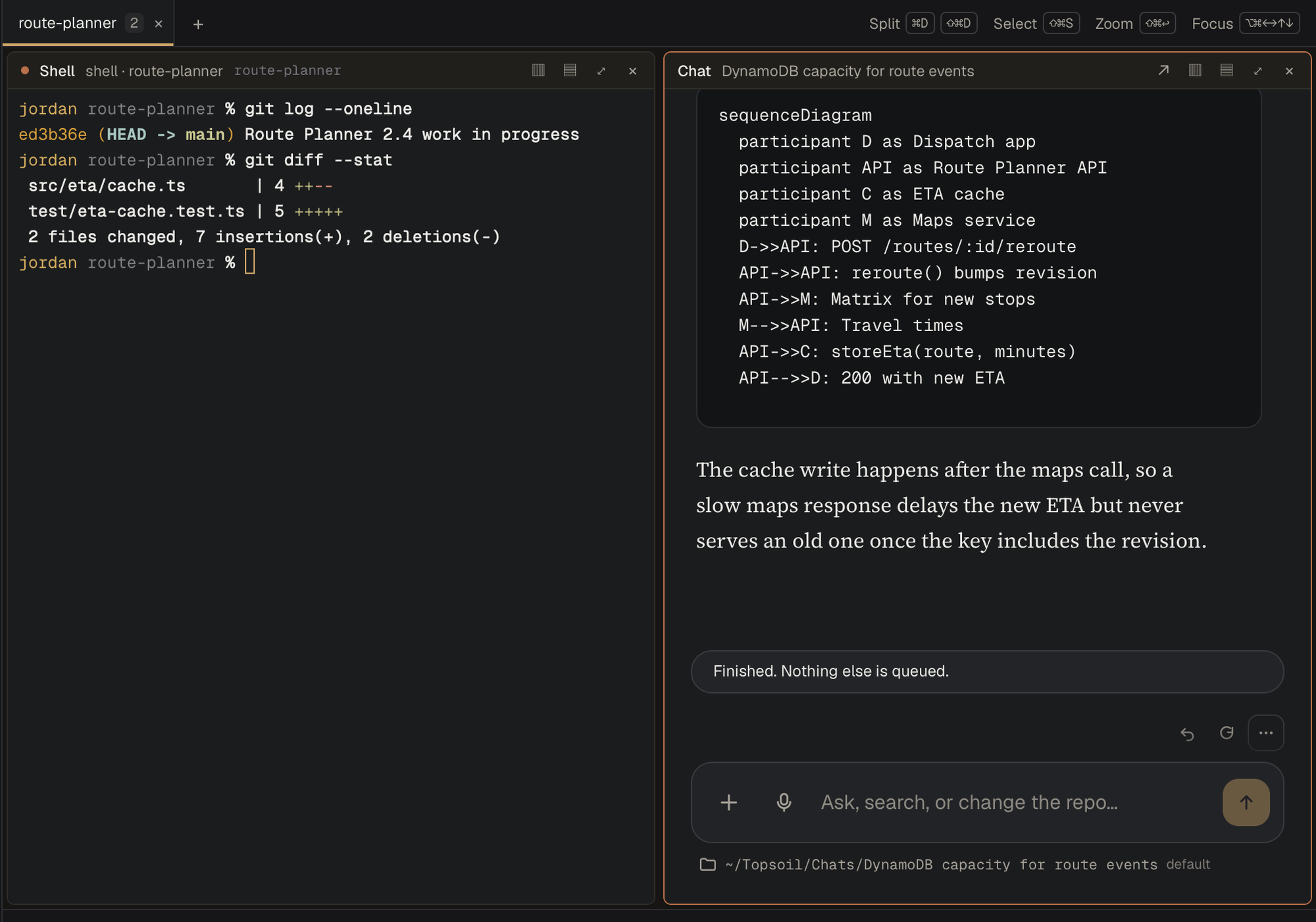
The Topsoil console on macOS: a shell pane running git log and git diff --stat beside a chat explaining the change, with a sequence diagram.

A shell and a chat, on the same folder. Terminals and conversations split by project, inside the app. The diagram on the right is rendered from the answer.

Artifacts
$ /report Route Planner 2.4 readiness
write document docs/route-planner-2.4-readiness.pdf
  • route-planner-2.4-readiness.pdf 3.31 KB
  • q3-proposal-summary.docx 18 KB
  • depot-readiness.xlsx 24 KB

Saved into the working folder and listed under Artifacts.

Real files, not just answers

/report, /memo and /sheet write PDF, Word and Excel into the working folder. Diagrams are rendered. A library of your own documents, held in your own storage, is what the retrieval runs against.
Control

Every edit and every command is a decision.

Review patch
src/eta/cache.ts (+1 −1)
−  const entry = etaCache.get(route.id);+  const entry = etaCache.get(`${route.id}:${route.revision}`);
Accept once1 Rejectesc Always this path Always this tool3

The diff arrives before the write. The scope of your answer is on the buttons: once, this path, this tool, or the rest of the chat.

Mode
  • ✓ Ask before edits
    Topsoil asks before it changes files, runs commands, or uses the network.
  • ✓ Edit automatically
    File changes in this folder apply without asking. Commands and the network still ask.
  • ✓ Plan mode
    Topsoil only reads and researches, then proposes a plan for you to approve.

Shift+Tab in the message box switches modes.

Three modes, stated plainly. Plan mode only reads until you approve what it proposes.

Settings · Agent features
  • ✓ File edits
    apply_patch, write_file, notebook_edit, and saved plans.
  • ✓ Shell commands
    run_command, PowerShell, background jobs, and /sandbox.
  • ✓ Git
    git status/diff/log/commit, pull requests, and worktrees.
  • ✓ MCP servers
    Start stdio/HTTP/WebSocket servers and their tools, prompts and skills.
  • ✓ Language servers
    LSP diagnostics and code navigation after edits.
  • ✓ Subagents and tasks
    explore/implement/review/verify, delegate, and background tasks.

Agent tools can read and modify files, run commands, and start local servers. Only enable for projects you trust.

Capabilities are enumerated, not implied

Every agent capability is listed with what it actually permits — which files it may write, which commands it may run, which servers it may start. They are off until someone turns them on, and turning one on is a deliberate act with a confirmation.

That list is also the honest answer to "what can this thing do to my machine?" — a question most AI tools answer with a paragraph of prose.

Terminal · macOS, Windows, Linux

The whole agent, where a GUI cannot go.

On a build server, a jump host or a locked-down workstation, a desktop application is not an option. Same models, same gates, same project context — in a terminal.

jordan@route-planner — topsoil models
$ topsoil models
Models in us-east-1 (refreshed now)

OpenAI
  openai.gpt-5.6-terra              GPT-5.6 Terra         tools · docs
  openai.gpt-5.4                    GPT-5.4               tools · docs

Anthropic
* us.anthropic.claude-sonnet-4-5    US Claude Sonnet 4.5  tools · docs · images
  us.anthropic.claude-opus-4-5      US Claude Opus 4.5    tools · docs · images

xAI
  us-gov.xai.grok-4.6               US-GOV Grok 4.6       tools · docs · images

Amazon
  us.amazon.nova-pro-v1:0           US Nova Pro           tools · docs · images

* default model     tools / docs / images: what the CLI sends

Models come from your account. Enable a family and it appears here. The default is marked; /model opens a scrollable picker rather than asking for an id.

jordan@route-planner — topsoil
Topsoil 0.7.5  ·  us.anthropic.claude-sonnet-4-5  ·  act/default  ~/Projects/route-planner

› Explain the stale ETA cache and propose a fix

· search     etaCache                  4 matches
· read       src/eta/cache.ts          41 lines
· read       src/eta/reroute.ts        28 lines

The cache key is route.id only, and a reroute keeps the same id while it changes the
stops, so the next request serves the old entry until the five-minute TTL
runs out.

Fix — add the route's revision to the key:

  const key = `${route.id}:${route.revision}`;

Review patch  src/eta/cache.ts  (+1 −1)
  −  const entry = etaCache.get(route.id);
  +  const entry = etaCache.get(`${route.id}:${route.revision}`);

  y accept  ·  n reject  ·  a always this path  ·  esc stop the turn

› Ask anything · / for commands · @ for files

Real work, and the same gate. Search the repository, read the file, explain the defect, propose the change — and the patch waits for a keystroke before it is written.

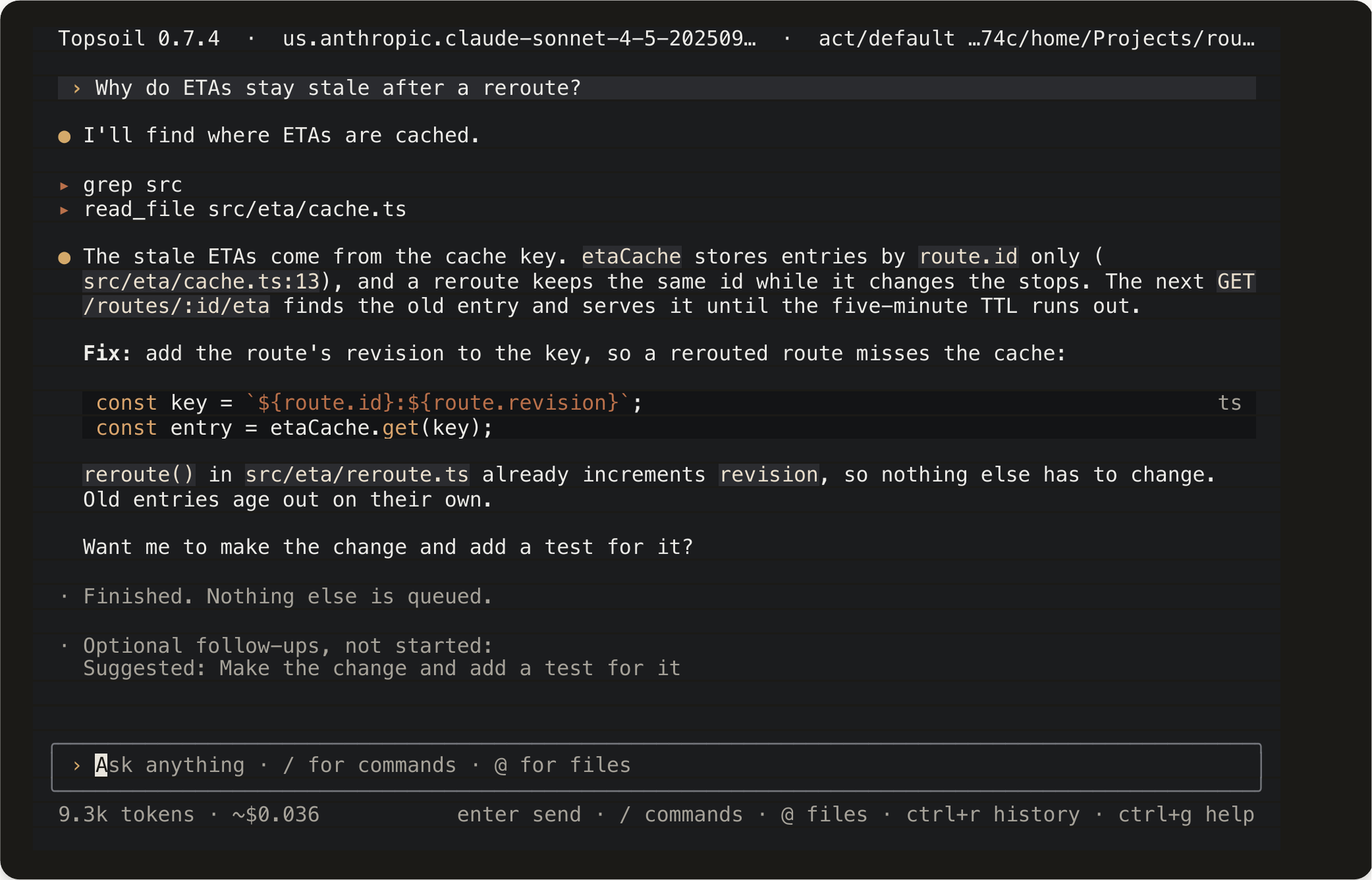
Topsoil in a terminal: it greps the source, reads src/eta/cache.ts, explains that the cache key is route.id only, and proposes adding the route revision to the key.

Explain, then propose. The tool calls are listed as they run, the answer cites the file and line, and the suggested change is rendered as code. Tokens and cost sit on the footer throughout.

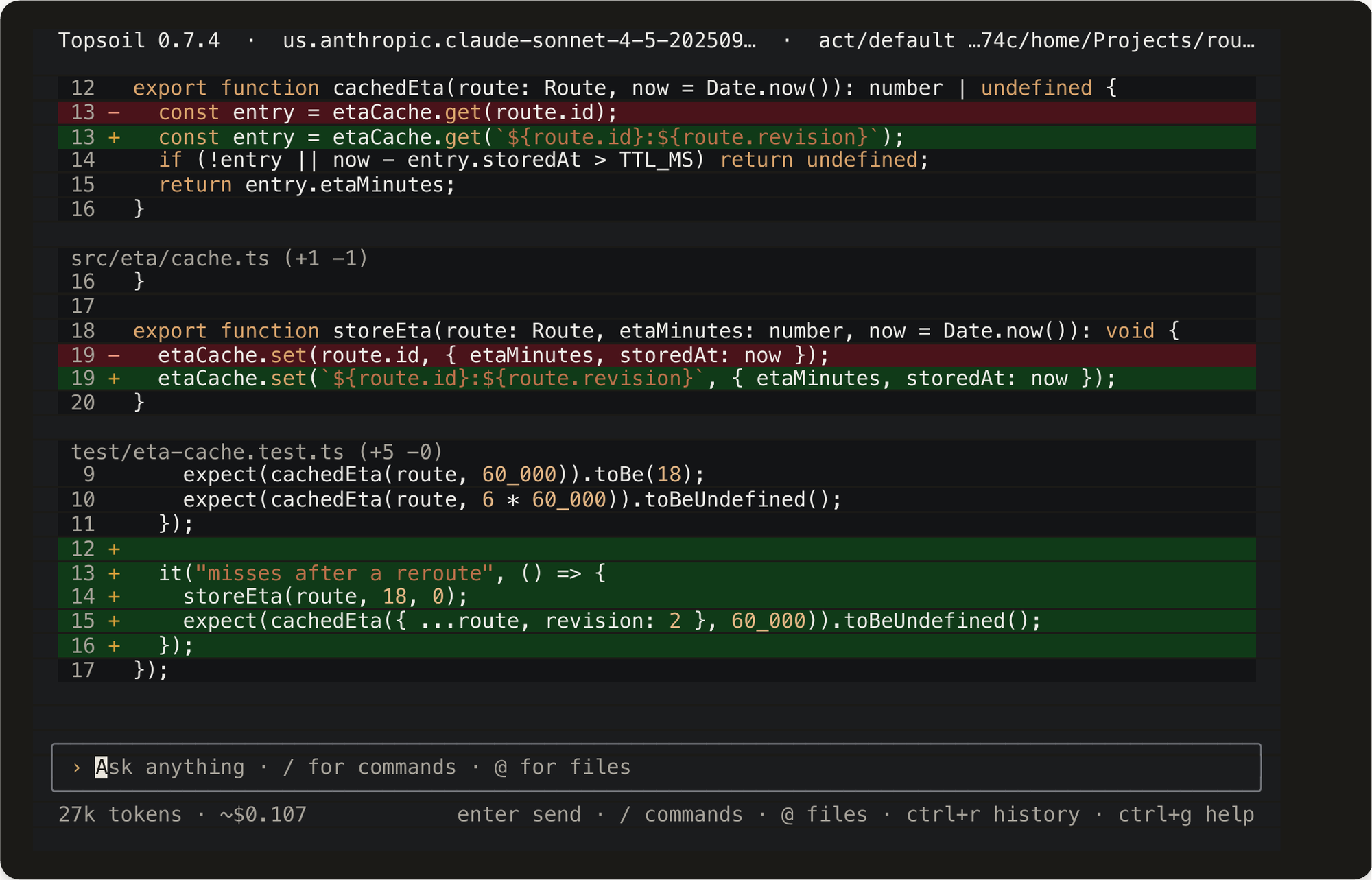
A Topsoil terminal diff across two files: the cache key change in src/eta/cache.ts and storeEta, plus a new test added to test/eta-cache.test.ts.
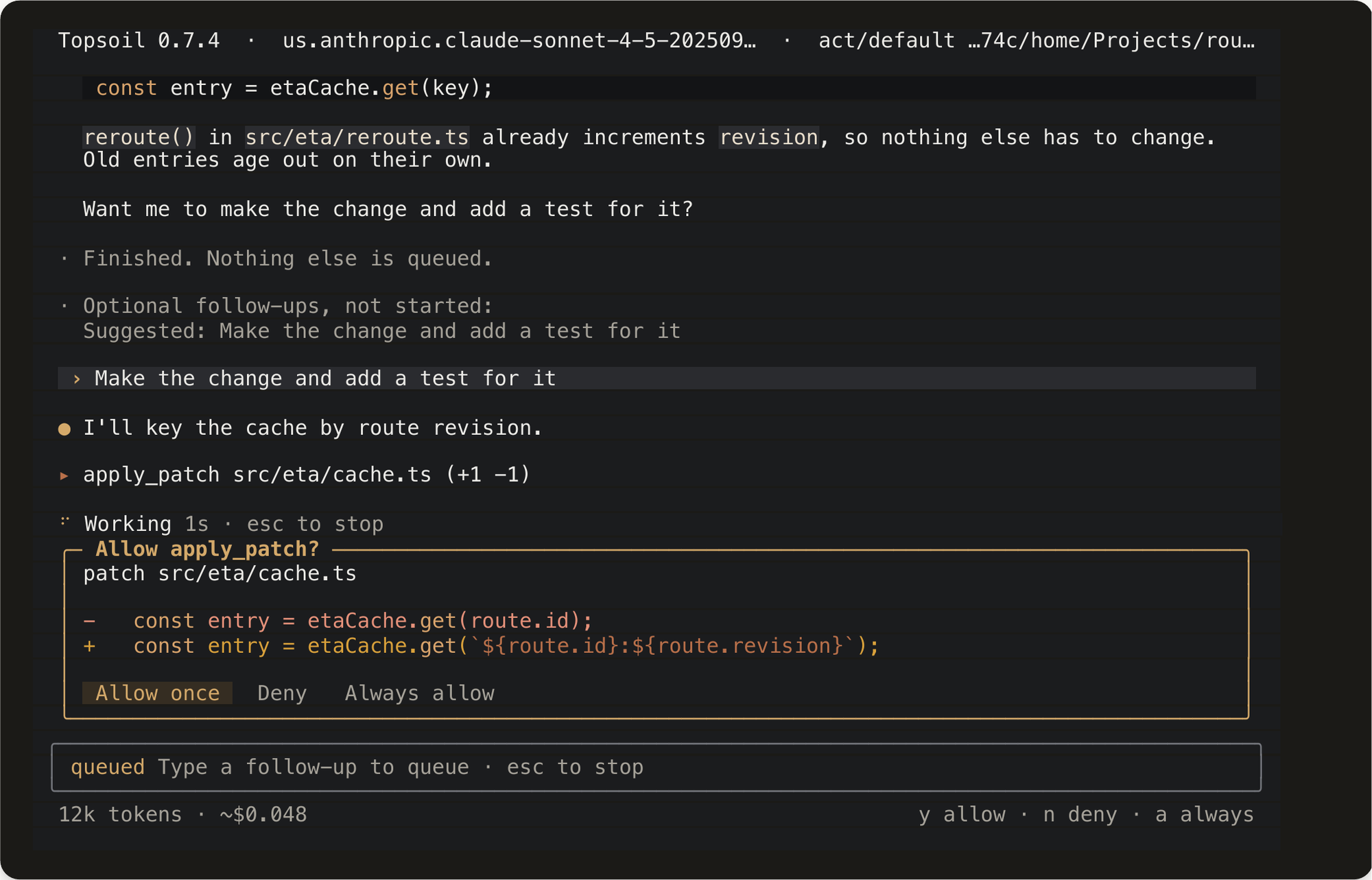
A Topsoil terminal permission prompt: Allow apply_patch? with the diff for src/eta/cache.ts and Allow once, Deny, Always allow.

Nothing is written without a keystroke. apply_patch stops and shows the exact lines it wants to change — y allows it once, a allows that path for the session.

And then it writes the code. /diff after the fix: the key change in two places in src/eta/cache.ts, and a new test in test/eta-cache.test.ts that fails without it.

Editor · VS Code

A bridge, not a third place to work.

There is deliberately no Topsoil panel in VS Code. The agent keeps running as topsoil in the integrated terminal, and the extension lends it what only the editor knows.

  • Unsaved buffers and your selection, so "fix this" means the code actually on screen.
  • Open files and diagnostics, so the agent sees what the language server sees.
  • A diff after the turn, opened on the files it wrote.
  • Installs from the desktop app's Settings or topsoil vscode install — it ships inside the products you already have, not through the Marketplace.

One agent, three ways in. Adding the editor does not add another host to secure, another log to collect, or another copy of your source in flight.

Get started

See it against your own codebase.

A proof of concept runs in a secure enclave with your models and your material, and ends with findings you can act on.